Страница 1 из 1
Помогите настроить tuxguitar
Добавлено: 18 апр 2015, 20:26
6blkahax
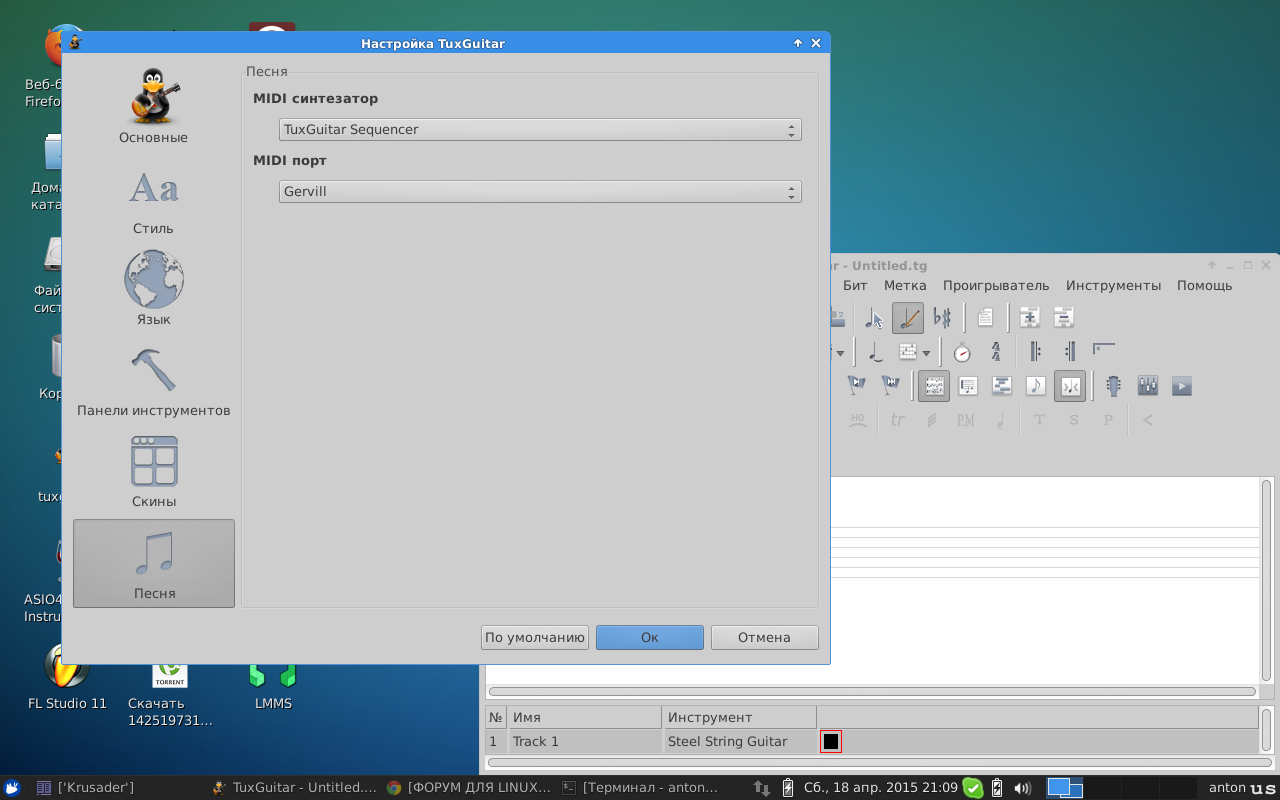
Поставил таксгитар. Звука нет. Поставил как большинство советует timidity++ и поставил на него. Но возникла проблема - если таксгитар проигрывает трек другие звуки не могут проигрываться. Говорили что там надо dmux конфигать. Я не знаю его. Поэтому нашел вариант с помощью gervil. Проблема решилась - появилась новая - звук архиговенный - электрогитара на электрогитару не похожа и половина барабанов какие-то непонятные звуки издают. Где можно в гервиле sf2-шку поменять? Или вернуться к старому варианту и возиться с dmux?
Re: Помогите настроить tuxguitar
Добавлено: 18 апр 2015, 20:42
ALEXX
https://nixm.ru/viewtopic.php?f=12&t=105 вот тут про настройку ALSA ( она действительно начинает "Звучать как надо")
Сайт tuxguitar почему то лежит, поэтому у них посмотреть пока нечего ( сам не работал в этой проге ) и Почему бы не поюзать Guitar Pro или что то еще?
Re: Помогите настроить tuxguitar
Добавлено: 18 апр 2015, 20:46
6blkahax
hotmax писал(а):Почему бы не поюзать Guitar Pro или что то еще?
Мы в xubuntu. Кстати, pulseaudio я давно отказался.
Re: Помогите настроить tuxguitar
Добавлено: 18 апр 2015, 20:54
6blkahax
причем когда через timidity проигрываешь мидю звук отличный, даже более убедительный чем стандартная виндузная мидя. а как таксгитаром то пердунство какое-то.
Re: Помогите настроить tuxguitar
Добавлено: 18 апр 2015, 20:59
ALEXX
В настройках tuxguitar программный MIDI timidity++?
Re: Помогите настроить tuxguitar
Добавлено: 18 апр 2015, 21:06
ALEXX
Improve Sound Quality
Ignore this section if you don't care how good T.G. sounds when playing scores. By default TuxGuitar uses a Midi sound file that synthesizes most non-percussion instruments to sound like variants of an organ. If you follow the easy procedure here, the instruments will sound much more realistic.
Download Midi SoundFont file FluidR3_GM.sf2 to wherever you want it to live. This is Frank Wen's free soundfont format general midi / GS (General Sound) file, release 3. Or download it to anywhere and move it to the directory where you want it to live.
Start up TuxGuitar
Use pulldown menu Tools => Plugins.
Select Java Sound Api plugin and hit the Configure button at the bottom.
Click the Use custom soundbank radio button.
Use the browse button and select the FluidR3_GM.sf2 file that you put in place before.
OK the changes and close.
Exit and then restart TuxGuitar.
Это единственное что нашел про качество звука

Re: Помогите настроить tuxguitar
Добавлено: 18 апр 2015, 21:13
6blkahax
Re: Помогите настроить tuxguitar
Добавлено: 18 апр 2015, 21:20
6blkahax
hotmax писал(а):Improve Sound Quality
Ignore this section if you don't care how good T.G. sounds when playing scores. By default TuxGuitar uses a Midi sound file that synthesizes most non-percussion instruments to sound like variants of an organ. If you follow the easy procedure here, the instruments will sound much more realistic.
Download Midi SoundFont file FluidR3_GM.sf2 to wherever you want it to live. This is Frank Wen's free soundfont format general midi / GS (General Sound) file, release 3. Or download it to anywhere and move it to the directory where you want it to live.
Start up TuxGuitar
Use pulldown menu Tools => Plugins.
Select Java Sound Api plugin and hit the Configure button at the bottom.
Click the Use custom soundbank radio button.
Use the browse button and select the FluidR3_GM.sf2 file that you put in place before.
OK the changes and close.
Exit and then restart TuxGuitar.
Это единственное что нашел про качество звука
Спасибо. Кажется, проблема решена
Re: Помогите настроить tuxguitar
Добавлено: 18 апр 2015, 21:23
ALEXX